Sunday, May 31, 2026
Apparently
Chair yoga is not for me. I used to do yoga back in the day when I could get up from the floor fairly easier, and I really enjoyed it and found it beneficial. I thought chair yoga would be great, so I went to a library programme, but I didn't think about how much arm work there would be, things like raising the arms above the head and hugging yourself. I have one torn long head on the biceps tendon and the rotator cuff is also torn on the right which was never repaired; on the other side both have been torn in a fall and repaired, but it has been hurti for awhile, so I've been wondering if I should go back to my orthopaedist. I still have range of motion issues on that injured side and probably always will. There's only so much moddification I can do. I did modify the legs a little. I didn't put my lower legs on my thighs, as that does hurt, even after knee replacement, although I can do it briefly. But my back hurts today from doing the twists, and I had to get dog food and cat litter today. Even though the food was 18.5 lbs and the cat litter was 'lightweight' (the torn rotator cuff/biceps tear on the right was from pulling regular cat litter off a shelf, so I'm really careful with that and only use the lightweight, but it's only 10 lbs. difference). So everything kind of hurts today, even with Tylenol.
I'm signed up to do it again next Saturday. I'm thinking maybe not. If I do it, I may stick with books and at home videos where I can modify in peace. I know it's not a competition, but it feels like I'm failing if I don't try to do them as demonstrated in front of other people. And I suffered for that idiocy today.
Went to a lovely concert today
of mediaeval music presented by Musick's Company - the Center for Old World Music in the New World 'Medieval Chivalry: Tales of Knights and Courtly Love'. I was happy because I could read much of the Middle French and Middle German lyrics.
Saturday, May 30, 2026
I travelled a lot the other day, and found this gem
This gorgeous card catalogue is in the Boyle County Public Library and has been repurposed as a seed library. Patrons are allowed to take up to three seed packets each visit by notifying circulation staff. The binders include informational newsletters on how to grow plants. Drawers are organised according to type of plant [Flowers, Herbs, Vegetables, etc.]
PS Yes, after I took the photo my sense of order overcame me and I closed the open drawer that was nagging me.

PS Yes, after I took the photo my sense of order overcame me and I closed the open drawer that was nagging me.

Monday, May 25, 2026
My Goodreads review for All These Ghosts, which was book #10 for the year (out of a goal of 15, so I'm ahead) Whoo!
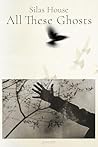 All These Ghosts by Silas House
My rating: 5 of 5 stars
This is a beautiful collection of poetry. I originally borrowed it from the library, then got it in audiobook form (narrated by the author), and then bought the book so I could own the text as well. I wanted both. I highly recommend both. Hearing the poems in his own voice, with his accent, made them leap from the page. I am a 9th-generation Kentuckian, although I am from the Bluegrass, not the Appalachians. But this volume filled me with pride for my people, especially 'Those Who Carry Us'. My favorite poem is 'For Those Who Have Loved Old Dogs'. As he reads it, his voice nearly breaks. You can tell he loves the dogs he has himself had. You feel a nearness to the author in the text, but in his voice even more so. The book is a wonderful collection of poems that make you feel, think, and wonder. They touch you just as poetry should. The audiobook is as if you had invited the author into your home, had him over for salmon cakes and beans, and by the fireplace, telling you stories afterwards.
View all my reviews
Another beautiful poem, one anyone who has loved a dog will appreciate

[Photo is of my own beloved dog, Cerys, now gone so many years, almost 20. But she lives on in my heart as if it were yesterday, my Cer-Bear 1991-2007]
For You Who Have Loved Old Dogs
Old Andy is a big dog, black as a
night sky in the most lonesome winter months.
He is fat even though he doesn't eat
much these days. His man is one of the best
folks I know. They were hiking deep in the
high mountains when good Andy's back legs stopped
their work. The old dog folded himself down
on the path, his eyes lighting on his mani's
to apologize. My friend carried him
nearly a mile, this great sprawl of blessed
animal, who must have lain in his arms
both thankful and ashamed. They collapsed
together at the end of the steep trail,
holding on to each other, exhausted.
I'm thankful for you who take care of old
dogs. I'm glad you have one another when
you need a friend the most, that you've had times
of stillness, watching the world, that you know
the grace of silence together. I thank
the infinite eternity and the
God of my understanding for people
like you, who carry them when they need you.
Three times now I've held an old dog
in my arms as they left me. Three times
I felt their heartbeats fade away on my palm,
witnessing a shooting star become
more darkness. The end. All lost and gone.
I've grieved for each of them just as much as
I have for people I've loved. I've carried
the sweet sorrow with me, a heft I wish
I did not have to bear but one that I
will always cherish now. The burden
of my empty arms is the greatest weight.
Silas House. All These Ghosts. Durham: Blair, 2025, p. 59.
Sunday, May 24, 2026

Tuesday, May 19, 2026
Enchanting
Ye Vagabonds :: Willie O Winsbury
by u/RustyBike39 in Irishmusic
Gorgeous harmony. I love the song 'Willie O'Winsbury' anyway, but this version...is absolutely beautiful, and it was nice to see the musical instruments at the shopkeeper's. I'm assuming it was in Donegal from the one sign. Have a listen if you love traditional Irish or Celtic music. And do so if you're not familiar with it. You'll fall in love with it, trust me. They have a YouTube page as well:https://www.youtube.com/channel/UCMftOxnC_Jh5JAjyllxDgYQ
Friday, May 15, 2026
Oooohhh!!!
So I got an email yesterday from Amazon about a new update to the Kindle Scribe that gives you the ability to add shapes from the writing toolbar, but also Smart Shapes, which allows you to draw a shape, say a triangle, then hold the pen for a moment, and the shape will snap into perfect lines. What they didn't say in the e-mail is:
- You can then move and rotate the shape by manipulating it, even reactivating it later. This currently just works in notebooks, but it's really useful.
- The same update lets you handwrite on images in eBooks with enhanced typesetting and on Word documents sent to Kindle.
- Most importantly, this update is available now for my Kindle Scribe (the 2022 original Scribe), but not yet for the two later models. Hmm...
Anyway, if you have the original Scribe and the update hasn't downloaded yet, you can download it manually by going to this page and downloading it to your computer, then moving it over via USB. Be sure you choose the correct version for your device. And if you're reading this later, it should be version 5.19.4 [or presumably later]. The image below is Amazon's demonstration from the email, but yes, it works just like depicted.

Subscribe to:
Posts (Atom)